myRAMS
Manage your home loan accounts online with myRAMS
What are e-Statements and how do I receive them?
e-Statements are electronic statements that are available to view online via myRAMS. They are sent instead of paper statements that would otherwise be mailed to you.
If you are registered to receive e-Statements, you can view them online in myRAMS.
From there, you can view your home loan and deposit statements online. You can also print and save the statements, which look the same as a standard paper statement.
How do I switch to e-Statements?
For home loans customers, switching is simple:
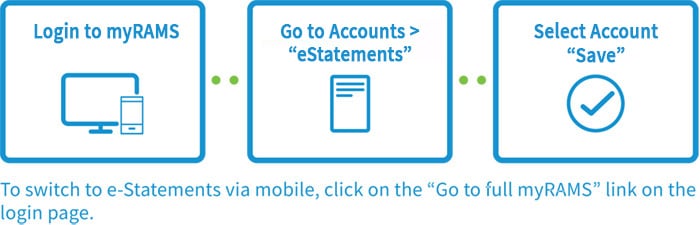
For joint home loans customers, all account holders must have already registered for myRAMS and have provided RAMS with an email address to enable you to switch to e-Statements.
If I switch to e-Statements, will I still receive paper statements?
If you switch to receive e-Statements, paper statements will no longer be sent to yourself. There may be times when we send you paper statements, such as where electronic delivery is unavailable or our records indicate you are no longer registered for myRAMS.
If I have e-Statements, can I switch back to paper statements?
Yes you can switch back to paper statements at any time by ringing your RAMS Customer Service Team on 13 RAMS, that’s 13 7267.